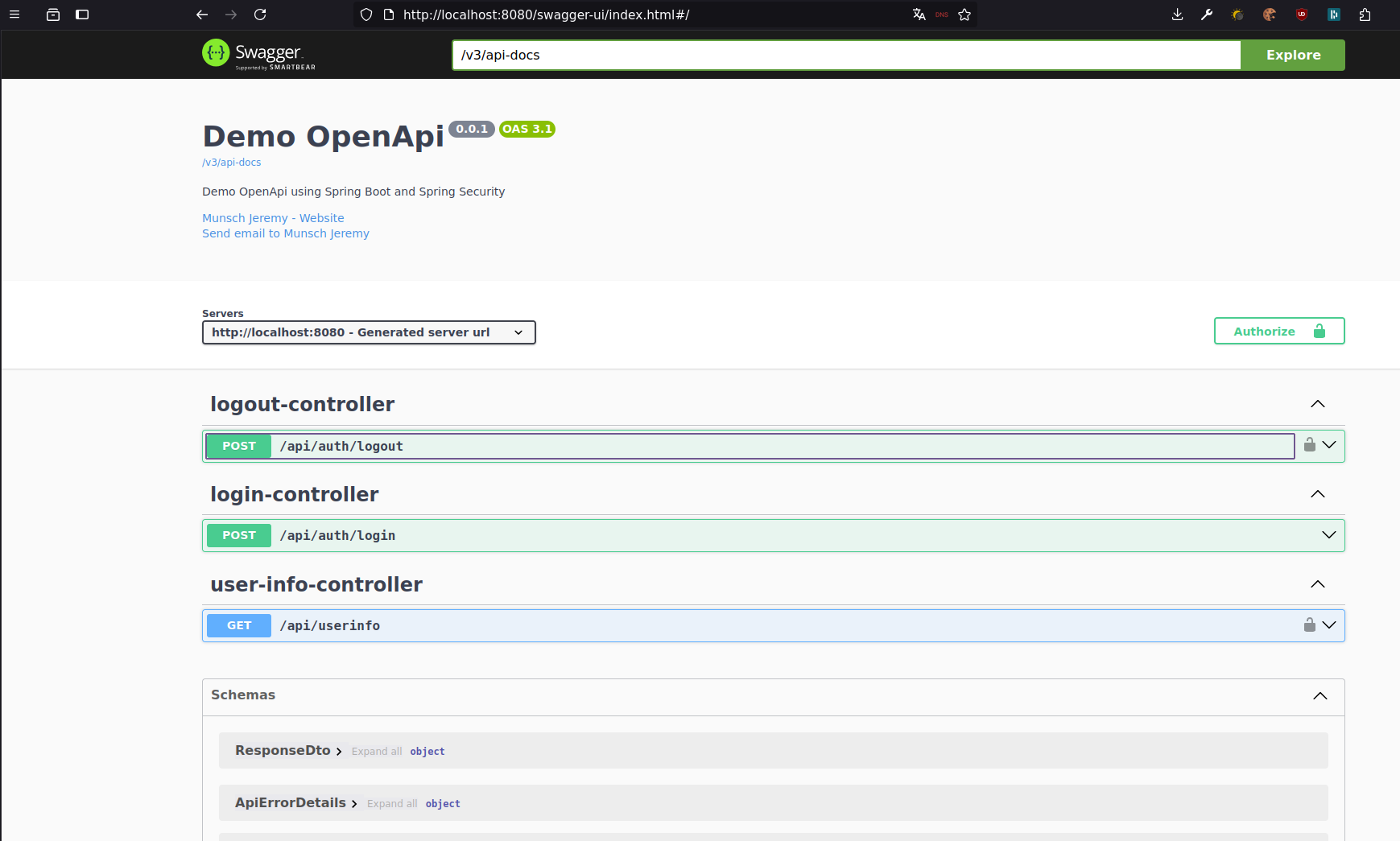
The code for this tutorial is available on GitHub if you wish to inspect it directly:
https://github.com/Kwaadpepper/Demo-SpringBoot-OpenApi
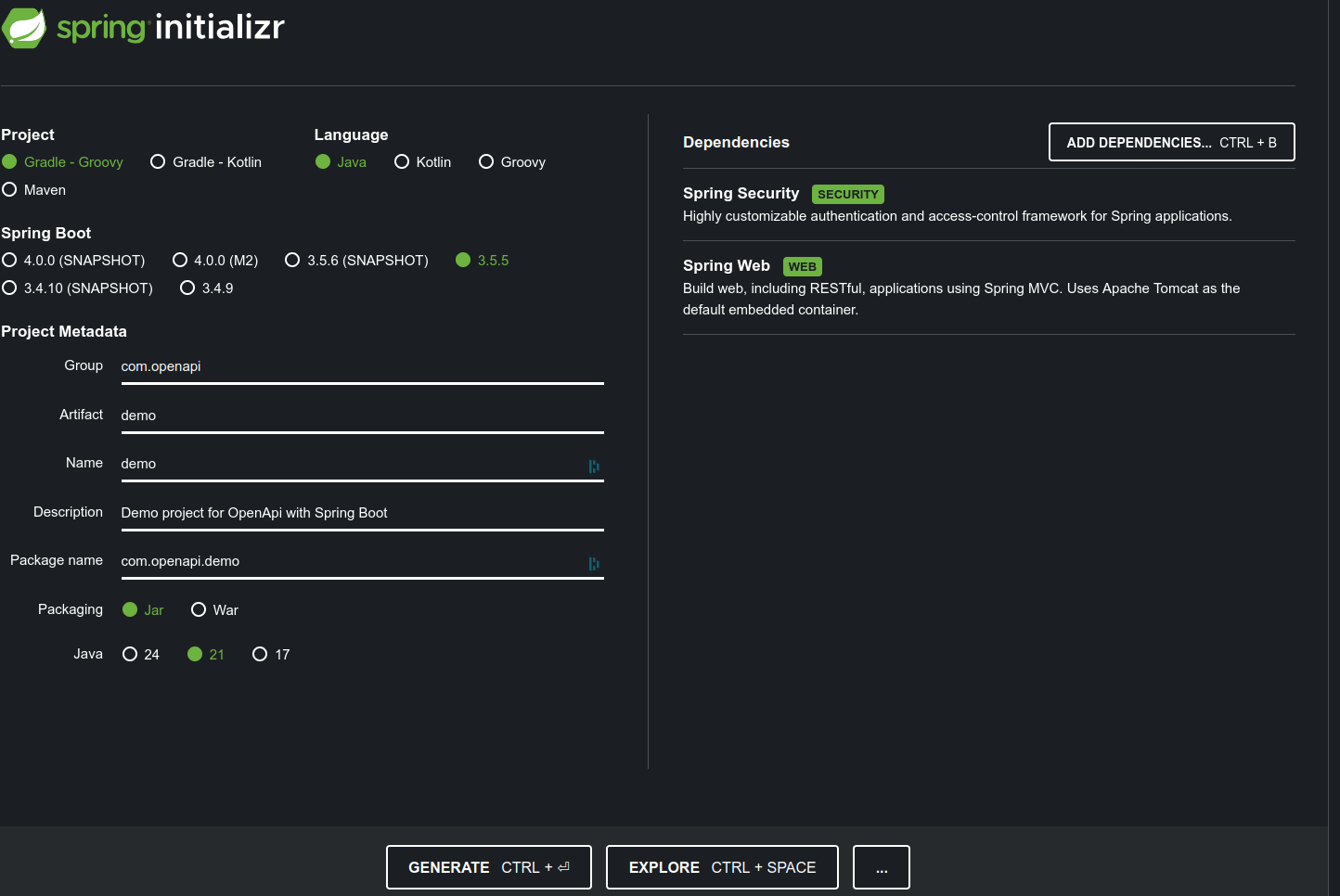
Project Initialization
We will use Spring Web, Spring Security for production-like authentication, and OpenAPI with Swagger UI integration.
We will set up sample routes and configure annotations.
You can use https://start.spring.io/ to scaffold the project. Here, we use Java 21 and Spring Boot 3.5.5.
Here are the required Gradle dependencies:
plugins {
	id 'java'
	id 'org.springframework.boot' version '3.5.5'
	id 'io.spring.dependency-management' version '1.1.7'
}

dependencies {
	implementation 'org.springframework.boot:spring-boot-starter-security'
	implementation 'org.springframework.boot:spring-boot-starter-web'
    implementation 'org.springframework.boot:spring-boot-starter-actuator'

	implementation 'org.springdoc:springdoc-openapi-starter-webmvc-api:2.8.11'
	implementation 'org.springdoc:springdoc-openapi-starter-webmvc-ui:2.8.11'

	testImplementation 'org.springframework.boot:spring-boot-starter-test'
	testImplementation 'org.springframework.security:spring-security-test'
	testRuntimeOnly 'org.junit.platform:junit-platform-launcher'
}
Notice that we added springdoc dependencies to publish the OpenAPI spec and enable the Swagger UI web interface.
Configuring OpenAPI
You need a configuration Bean to describe the API metadata:
@Configuration
public class OpenApiConfig {

  @Bean
  OpenAPI openApi() {
    return new OpenAPI()
        .addSecurityItem(new SecurityRequirement().addList("Cookie Authentication"))
        .components(
            new Components().addSecuritySchemes("Cookie Authentication", createApiCookieScheme()))
        .info(
            new Info()
                .title("Demo OpenApi")
                .description("Demo OpenApi using Spring Boot and Spring Security")
                .version("0.0.1")
                .contact(
                    new Contact()
                        .name("Munsch Jeremy")
                        .email("github@jeremydev.ovh")
                        .url("https://jeremydev.ovh")));
  }

  private SecurityScheme createApiCookieScheme() {
    return new SecurityScheme()
        .type(SecurityScheme.Type.APIKEY)
        .in(SecurityScheme.In.COOKIE)
        .name(CookieService.COOKIE_NAME);
  }
}
And here is the corresponding Spring Security configuration:
@Configuration
public class SpringSecurityConfig {

  @Bean
  SecurityFilterChain securityFilterChain(
      HttpSecurity http, StaticCredentialFilter staticCredentialFilter) throws Exception {

    final List routesToIgnore =
        List.of(
            "/api/auth/login",
            "/v3/api-docs/**",
            "/swagger-ui.html",
            "/swagger-ui/**",
            "/actuator/**");

    return http.sessionManagement(
            // No cookie session, stateless API only.
            session -> session.sessionCreationPolicy(SessionCreationPolicy.STATELESS))
        // No CSRF for stateless APIs.
        .csrf(AbstractHttpConfigurer::disable)
        // 401 on unauthenticated requests.
        .exceptionHandling(
            handling ->
                handling.authenticationEntryPoint(
                    new HttpStatusEntryPoint(HttpStatus.UNAUTHORIZED)))
        // All requests must be authenticated unless explicitly ignored.
        .authorizeHttpRequests(
            request -> {
              // Non-protected URLs:
              request.requestMatchers(routesToIgnore.toArray(String[]::new)).permitAll();

              // Any other routes are protected.
              request.anyRequest().fullyAuthenticated();
            })
        // Custom filter for authentication.
        .addFilterAt(staticCredentialFilter, UsernamePasswordAuthenticationFilter.class)
        .build();
  }
}
Notice that in the OpenAPI configuration bean, cookie authentication is declared.
Routes are secured by default, matching our Spring Security setup.
To define a public route like /api/auth/login, use the following annotations:
  @io.swagger.v3.oas.annotations.parameters.RequestBody(
      content =
          @Content(
              mediaType = "application/json",
              schema = @Schema(implementation = LoginRequest.class),
              examples = {
                @ExampleObject(
                    name = "Login Example",
                    value = "{\"login\": \"user.example\", \"password\": \"Password.1\"}")
              }))
  @ApiResponses(
      value = {
        @ApiResponse(
            responseCode = "200",
            description = "Successfully authenticated",
            headers = {
              @Header(
                  name = "set-cookie",
                  description = "HTTP Only session cookie",
                  schema = @Schema(type = "string"))
            },
            content = @Content(schema = @Schema(implementation = ResponseDto.class))),
        @ApiResponse(
            responseCode = "401",
            description = "User could not be authenticated",
            content =
                @Content(
                    mediaType = "application/json",
                    schema = @Schema(implementation = ApiErrorDetails.class)))
      })
  @SecurityRequirements
  @PostMapping(
      value = "/api/auth/login",
      consumes = MediaType.APPLICATION_JSON_VALUE,
      produces = MediaType.APPLICATION_JSON_VALUE)
  public ResponseEntity login(@Valid @RequestBody final LoginRequest request) {
      ....
  }
@SecurityRequirements with an empty list explicitly tells Swagger that this route is public.
To create a complete API spec, add schema annotations to your request and response DTOs.
Generating an OpenAPI specification can also unlock automated client code generation via tools like HeyApi (much like contract-first SOAP or gRPC tooling).
For more details, check out the official Swagger annotations documentation and Swagger Codegen.
Accessing the OpenAPI Spec
Once your Spring Boot server is running:
View the raw OpenAPI JSON specification at http://localhost:8080/v3/api-docs and explore the interactive documentation at http://localhost:8080/swagger-ui/index.html